Your Cal.com or Calendly booking widget is built entirely in client-side JavaScript, and the AI search crawlers behind ChatGPT, Claude and Perplexity never execute that script. They fetch the raw HTML, find an empty <div> and a <script src> tag, and move on. The event name, the available slots, the "book a call" text your visitors see never reaches the crawler at all, which means it cannot exist in your business the way ChatGPT or Claude describe it.
This is not a theory. We found it on our own site: a two-bug regression in our hand-rolled Cal.com embed loader left the booking widget completely blank for a stretch in August 2026, and the fix taught us exactly what an AI crawler sees when a widget like this loads wrong, or doesn't render at all for a bot that can't run JavaScript in the first place. Here is why the gap exists, which crawlers it affects, and how to close it without ripping out the scheduling tool you already use.
- Why it happens: Cal.com and Calendly inject their calendar into an empty div using a JavaScript loader. Until that script runs, the div has no content.
- Who it affects: GPTBot, ClaudeBot and PerplexityBot, which fetch raw HTML and never execute JavaScript.
- Who is exempt: Google's Gemini, because Google-Extended reuses Googlebot's JavaScript rendering pipeline.
- The fix: Add a short, static HTML fallback (offer, duration, direct link) that exists before any script runs, alongside the widget.
Why does a JavaScript booking widget disappear from AI search?
Cal.com's inline embed works by injecting an iframe into an empty container after a loader script runs in the browser. The standard integration is two pieces: a <div id="booking-widget"> placeholder and a <script src="https://app.cal.com/embed/embed.js"> tag that fetches the real calendar and writes it into that div once the page loads. Calendly's popular embed follows the same pattern. Until the script executes, the div is empty. There is no event title, no date, no time slot and no button text anywhere in the document.
That is fine for a human visitor with a browser, because browsers run JavaScript by default. It is a dead end for an AI crawler, because none of the major AI crawlers execute JavaScript. A joint analysis by Vercel and the technical SEO firm MERJ, published in December 2024, sampled over 500 million GPTBot fetches and found zero evidence of JavaScript execution. GPTBot downloaded a linked .js file in 11.5% of requests and never ran it; ClaudeBot downloaded one in 23.84% of requests and also never ran it (Vercel, "The rise of the AI crawler," Dec 2024). PerplexityBot behaves the same way. The finding holds up in 2026: none of the crawler operators have announced client-side rendering support since.
The practical result: any content that exists only after the browser runs your booking widget's script, including the offer, the calendar, the time zone and the confirmation copy, is invisible to the crawlers that feed ChatGPT, Claude and Perplexity's answers. A widget can look completely normal to you and be structurally empty to the systems deciding whether to mention your business.
Which AI crawlers actually skip JavaScript?
Not every crawler behaves the same way, and the exception matters for how you prioritise the fix.
| Crawler | Operator | Executes JavaScript | Evidence |
|---|---|---|---|
| GPTBot / OAI-SearchBot | OpenAI | No | 0 of 500M+ fetches (Vercel/MERJ, Dec 2024) |
| ClaudeBot | Anthropic | No | Downloads JS in 23.84% of requests, never runs it |
| PerplexityBot | Perplexity | No | Fetches raw HTML only, per the same analysis |
| Google-Extended | Google (AI Overviews) | Yes, via Googlebot | Reuses Googlebot's existing rendering pipeline |
| Bingbot | Microsoft (Copilot) | Partial, unconfirmed for AI answers | No public JS-execution data as detailed as Vercel's |
Google is the outlier. Because Google-Extended piggybacks on Googlebot's infrastructure, and Googlebot has rendered JavaScript for years, AI Overviews can pick up content that only appears after a script runs, eventually. GPTBot, ClaudeBot and PerplexityBot have no equivalent rendering step, so for ChatGPT, Claude's search feature and Perplexity, your raw HTML is the only version of your page that exists.
How do I check if my booking widget is invisible to AI crawlers?
You do not need special tooling to see what a crawler sees. Four checks, in order of speed:
Right-click the page and choose "View Page Source" (not "Inspect"). DevTools shows you the rendered DOM after JavaScript runs; view-source shows the raw HTML a non-rendering crawler receives. Search for your widget's container ID. If the div is empty, the crawler sees nothing.
Run curl -A "GPTBot" https://yoursite.com/book from a terminal and read the output. This is closer to what GPTBot actually receives than any browser tool, because curl never runs scripts either.
Google Search Console renders the page the way Googlebot does and shows you the rendered HTML. If your booking content appears there but not in curl's output, you have confirmed the gap: Googlebot renders, the AI-search crawlers do not.
Our free AI Visibility Checker audits whether AI crawlers can access and parse your site, checking robots.txt directives for GPTBot, ClaudeBot and PerplexityBot, llms.txt presence, and structured-data signals. It is a readiness audit, not a live citation tracker, and it will flag pages where the crawl-accessible content looks thin relative to what a visitor actually sees.
How do you fix a JS-only booking widget without replacing Cal.com or Calendly?
You do not need to abandon the embed. You need to stop relying on it as the only copy of your offer.
The fix is a static fallback: real HTML text and a real link that exist in the page before any script runs, sitting behind or alongside the widget container. The widget still loads normally for human visitors; the fallback is what a non-rendering crawler reads instead of an empty div.
| Widget only (current default) | Widget + static fallback | |
|---|---|---|
| What a human sees | Interactive calendar | Interactive calendar (unchanged) |
| What GPTBot/ClaudeBot see | Empty div, script tag | Event name, offer, direct booking link |
| Implementation effort | None (default embed) | One paragraph of server-rendered HTML |
| Risk of duplicate content | None | None, fallback and widget describe the same offer |
| AI citation eligibility | Effectively zero | Present, same as any other page text |
- Costs a few lines of server-rendered markup, not a re-platform
- Works immediately for every AI crawler that reads raw HTML
- Doubles as a graceful degrade for visitors with JavaScript disabled or blocked
- Gives you a real sentence to structure with Event or Service schema
- Static text cannot show live slot availability, only the offer and a link
- Needs updating manually if the offer or link changes
- Does not fix other client-rendered sections on the same page
What should the static fallback actually say?
Keep it short, factual and identical in substance to what the widget shows. Five elements cover almost every booking page:
"Book a free 30-minute AI visibility audit with AY Rank" reads as a sentence a crawler can extract and cite. A bare "Schedule" button label does not.
Even if the visual widget is an iframe, a plain <a href> to your Cal.com or Calendly link (not just an onclick handler) gives crawlers something concrete to point at.
"30 minutes, video call" is a fact a crawler can quote. Duration and format rarely change, so this line stays accurate without maintenance.
Wrap the fallback paragraph in JSON-LD Event or Service structured data. This is the same content twice, once for readability and once for machine parsing, which is exactly what schema is for.
Do not try to server-render actual open slots into static HTML. It goes stale within hours and creates a worse problem: content that is technically crawlable but factually wrong.
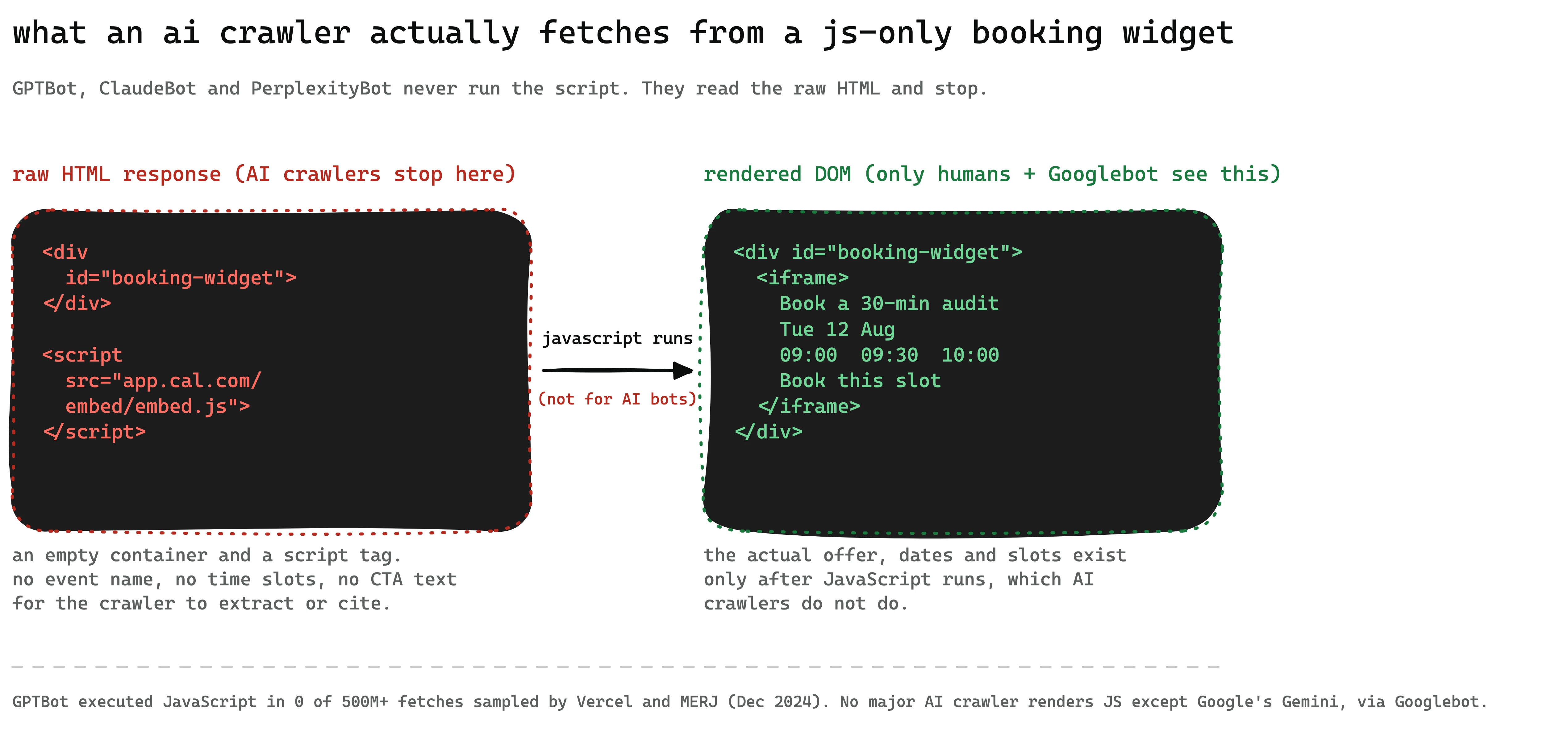 Side-by-side comparison showing the empty div and script tag an AI crawler receives from a JS-only booking widget versus the full calendar, event name and time slots that only appear after JavaScript renders the page
Does this JavaScript gap affect more than booking widgets?
Yes, and booking widgets are only the most conversion-critical example. The same crawlers that miss your Cal.com embed also miss any content that loads after the initial HTML response: pricing tables built with a client-side framework, FAQ accordions that fetch answers from an API, testimonial carousels populated by JavaScript, and product specification tables rendered client-side. If a page's most useful facts, price, availability, answer to a common question, only exist after a script runs, an AI crawler's view of that page is the empty shell around them.
The fix pattern is the same everywhere: the interactive version stays for human visitors, and a plain-HTML version of the same facts sits in the initial response for crawlers that never run the script. This is standard server-side rendering discipline, not a new requirement invented for AI search. It has simply become higher-stakes now that a growing share of research and buying-decision traffic starts inside a chat interface instead of a search results page.
Pairing this fix with the rest of your crawler-access setup matters more than doing it in isolation. If GPTBot and ClaudeBot cannot read your booking widget, check the same access at the site level with our robots.txt for AI crawlers guide and our llms.txt guide, which covers the file that tells AI systems what your site actually offers. A technical SEO audit that includes JavaScript-rendering checks will catch this class of gap across an entire site, not just one page.
If your booking widget, pricing table or FAQ section only exists after JavaScript runs, GPTBot, ClaudeBot and PerplexityBot never see it, because none of them execute JavaScript. Add a short, static HTML fallback with the same facts the widget shows, wrap it in the relevant schema, and the interactive version can stay exactly as it is for human visitors.
FAQ
Why is my Cal.com or Calendly booking widget invisible to AI search crawlers? Both tools render their calendar inside an empty HTML container using a JavaScript loader script. GPTBot, ClaudeBot and PerplexityBot fetch the raw HTML and never execute that script, so the container stays empty from their point of view, along with the event name, time slots and CTA text it would otherwise hold.
Do any AI crawlers render JavaScript? Google's Gemini is the exception, because Google-Extended reuses Googlebot's existing rendering infrastructure, which has executed JavaScript for years. OpenAI's GPTBot, Anthropic's ClaudeBot and Perplexity's PerplexityBot do not render JavaScript, confirmed by Vercel and MERJ's analysis of over 500 million GPTBot fetches in December 2024.
How do I know if my page has this problem?
View the page's source (not DevTools, which shows the already-rendered version) and look for your widget's container. If it is an empty tag with a script reference next to it, a non-rendering crawler sees nothing there. Running curl against the URL gives you the same view a crawler gets.
Will adding a static fallback break my Cal.com or Calendly widget? No. The static fallback is separate HTML that sits in the page before or around the interactive widget. The widget continues to load and function exactly as before for human visitors with JavaScript enabled; the fallback exists purely for crawlers and JavaScript-disabled browsers.
Does this affect Google rankings too? Less than it affects AI-search citations, because Googlebot can render JavaScript and Google-Extended shares that infrastructure. The bigger cost is being invisible to ChatGPT, Claude and Perplexity, where there is no equivalent rendering step to fall back on.
Is this the same issue as AI content detection or watermarking? No, and it is worth being precise about the difference. Content detection and watermarking are about whether text is judged to be AI-written; this is about whether a crawler can technically read your page at all. A perfectly human-written, expertly edited booking page is still invisible if its content only exists after a script runs.
What is the fastest fix if I cannot rebuild the page right now? Add one plain-HTML paragraph near the widget stating the offer, duration and a direct booking link, and wrap it in Event or Service schema. That single change gives every non-rendering crawler something concrete to read, without touching the widget itself.
Is this something a GEO agency actually fixes, or just an SEO detail? It sits squarely inside GEO work: making a site's real content accessible and citable to AI crawlers, not just search engines. Our GEO optimisation service audits crawler access across an entire site, booking widgets included, rather than treating it as a one-page fix.
Sources: Vercel, "The rise of the AI crawler" (Dec 2024), Cal.com embed-core documentation, Google Search Central, URL Inspection tool
This post is part of our Technical SEO guide. Related reading: The Future of GEO, The Complete Entity Optimization Playbook for AI Search, GEO for Fintech.

Walid founded AY Rank to help businesses dominate AI search. He leads the GEO methodology and oversees client strategy across 50+ cities in Europe, Middle East, and North Africa.
Full Bio →